


Paid Tester: Test Online Games
4.4644.00 Reviews
App Specs
- Version
- 1.0.11
- Updated On
- License
- Free
- Downloads
- 100,000+
- Developer
- Paid Tester AB
- Categories
- Lifestyle
- Platform
- Android
Screenshots


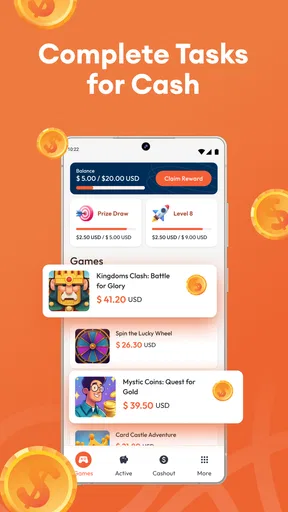



 Analysis by AppCompare
I approached Paid Tester: Test Online Games as something that might fit into an ordinary household rather than as a shortcut to easy income. The idea is appealing: use spare time to try multiplayer games, share impressions, and possibly receive payment for participating. In practice, the value depends on how well the testing opportunities fit your schedule, how carefully you read each assignment, and whether you are comfortable treating game sessions as structured tasks instead of pure entertainment.
This is a free lifestyle app from Paid Tester AB, aimed at people interested in testing online games across styles ranging from puzzles to action. It is rated for mature users aged 17 and over, so I would not treat it as a casual family download for younger players. The app has reached over one hundred thousand installs and holds a 4.4 average from roughly five thousand ratings, which suggests that the concept has attracted a meaningful audience. Those figures are useful context, but they do not replace the more important question: does this kind of testing fit the way you actually use your phone and your home internet connection?
How Paid Tester fits into a shared household
The clearest everyday scenario is a shared home where one person has a little free time in the evening and wants an activity that feels more purposeful than scrolling. Imagine finishing dinner, putting on headphones, and taking a multiplayer game assignment while another household member watches television. That arrangement can work well because the tester has a defined task and the other person is not forced to participate.
The situation becomes less convenient when the testing session needs concentration, conversation, or repeated attempts. Multiplayer games can be noisy and absorbing, and a household member may need the same device, the same room, or the same network at that moment. I would therefore plan testing sessions rather than opening the app whenever there is a spare minute. A short block of uninterrupted time is more useful than starting an assignment while cooking, commuting, or looking after someone else.
A second realistic use case is a couple or group of friends who enjoy comparing games. One person may be more comfortable with action controls while another notices interface problems or confusing instructions. Even when only one account is completing the assignment, discussing the experience afterward can help the tester remember specific friction points. The important boundary is that the person registered for the opportunity should be the one completing the required work. Sharing impressions is fine; pretending that several people completed one person’s session would undermine the purpose of testing.
For a shared device, I would be especially careful before handing the phone to another household member. The app is connected to an individual testing activity, so casual switching between people can create confusion about who accepted an assignment, who played it, and who should receive any follow-up communication. A separate personal device is cleaner, but if that is not possible, I would finish one person’s session completely, close the app, and make sure the next user understands that the account is not a general household profile.
The main household lesson is simple: treat the tester account as personal, even when the phone is shared. That approach avoids mixed feedback, accidental changes, and arguments over whether a task was actually completed. It also makes the experience more honest for the developer and more manageable for everyone at home.
Worth Reading Before You Choose

Flipboard Shows What News Apps Must Do Beyond the Feed

Switching to Android Auto Means Rethinking Your Driving Routine

Google Calendar Makes a Crowded Week Easier to Manage

Ludo King Makes the Most of the Minutes Between Plans

Baby Panda World Brings Quick Play to Modern Phones, but Its Game Library Feels Busy

ESPN’s Live Game View Makes Following Close Games Easier
Setting expectations before the first session
The store presentation makes the earning angle easy to notice, but I would not install this expecting guaranteed or immediate income. Testing opportunities are assignments, not a conventional job with a predictable timetable. Your results can depend on what is available, whether you match the requested audience, how carefully you follow the instructions, and whether your feedback is useful.
That distinction matters in a household budget. I would never count potential earnings toward rent, groceries, or a planned purchase. The sensible approach is to regard the app as an occasional paid activity that may make gaming time more worthwhile. If a person needs dependable income, a regular part-time role or established freelance work is a better choice because the schedule and payment expectations are clearer.
Before accepting anything, I would read the task details from beginning to end rather than jumping straight into the game. Look for the expected type of feedback, the required time commitment, any device or account conditions, and the way the result must be submitted. A useful tester does not simply say that a game was fun or boring. They notice where a new player hesitates, whether a button is easy to find, if a multiplayer interaction feels understandable, and what happens when something goes wrong.
One practical habit is to keep a short note while playing. I would record the moment a menu became unclear, when a match felt unbalanced, or when a loading step interrupted the flow. Writing these observations immediately is more reliable than trying to reconstruct them later. It also prevents a common mistake: giving broad praise while forgetting the concrete details that make feedback actionable.
Another useful boundary concerns personal time. If an assignment requires more attention than expected, I would stop and decide whether it still fits the original plan. Do not let the possibility of payment turn a relaxed evening into an unwanted obligation. A task that clashes with sleep, work, childcare, or a shared household commitment is not automatically worth accepting.
Keeping devices, accounts, and routines separate
Because this is a testing app rather than a normal game library, I would keep its role distinct from entertainment apps on the same phone. When I open it, I am entering a work-like flow: check the opportunity, understand the instructions, test the game, and submit thoughtful feedback. That mental separation helps prevent rushed responses and makes it easier to stop when the assignment is complete.
On a shared Android device, I would also avoid leaving the account open for the next person. This is not about assuming bad intentions; it is about preventing accidental taps, mistaken submissions, or confusion when someone else wants to play a different game. A simple handover routine works well: finish the task, review the submitted response, sign out or lock the device as appropriate, and tell the next user that the testing session is over.
The app supports Android 7.0 and later, which makes it accessible to people using older compatible phones rather than only the newest hardware. Still, compatibility is not the same as comfort. Multiplayer testing can be demanding on battery, storage, connection quality, and screen responsiveness, depending on the title being tested. I would begin with a charged device, a stable connection, and enough free space for any related game installation. Those are sensible preparations, not guarantees that every assignment will run equally well on every phone.
If several people in a home want to participate, I would coordinate before anyone accepts a task. Decide whose device will be used, who has the available time, and whether the session might interfere with another person’s online activity. This is particularly important in homes with limited bandwidth. A large game download or active multiplayer session can affect video calls, streaming, or another player’s match.
One non-obvious trade-off is that an older phone may be useful for testing real-world performance, but it can also make the experience harder to interpret. If a game stutters because the device is struggling, the tester needs to distinguish that from a problem in the game itself. I would note the device context honestly instead of treating every slowdown as a design flaw. That kind of precision makes feedback more credible.
Coordinating multiplayer testing with other people
Multiplayer assignments add a social layer that ordinary app testing does not always have. You may need to communicate with other players, react quickly, or judge whether the game explains its rules clearly. In a shared household, I would schedule these sessions when interruptions are unlikely. A doorbell, conversation, or request for the phone can break concentration and leave you with incomplete impressions.
There is also a difference between testing with people you know and testing with strangers. Friends or relatives may make the session more comfortable, but they can unintentionally soften criticism. If everyone already enjoys the same genre, confusing mechanics may be overlooked because the group knows how games usually work. I would deliberately ask myself what a first-time player would see, not just whether my household found the session entertaining.
When coordinating with another person, agree on the practical details before starting: who is playing, which device belongs to whom, and whether the other person is merely observing or actively participating. Do not assume that a second player is automatically part of the official test. The app’s assignment instructions should determine what counts as valid participation, and the safest approach is to describe the session accurately in your feedback.
A helpful workflow is to separate the play phase from the discussion phase. During the game, focus on what happens on screen and how easy it is to understand the next step. Afterward, compare notes with the other participant. This prevents one person’s opinion from influencing the other too early and gives you a chance to identify differences between experienced players and newcomers.
I also think household coordination should include a stopping rule. If the game becomes frustrating, the connection is unstable, or the assignment is no longer enjoyable enough to justify the time, pause and reread the instructions before continuing. More play does not always produce better feedback. Sometimes the most useful observation is that a particular problem appears quickly and consistently.
Age, trust, and sensible participation
The mature 17-plus rating is an important part of deciding whether this app belongs on a shared family device. I would keep younger children away from the account and from assignments unless an adult has independently checked that the specific activity is appropriate. The age label is not a promise that every tested game will suit every teenager or adult; it is a reminder to take the content and the testing context seriously.
This matters even more when a child is curious about earning money through games. I would explain that the app is not a general reward system and that participation involves personal responsibility, instructions, and account boundaries. A young person should not use an adult’s account, submit feedback under someone else’s identity, or make decisions about payments without the account holder understanding what is happening.
Trust also applies to the games themselves. Testing an unfamiliar multiplayer title can involve communication with people outside the household and exposure to content that is not as predictable as a single-player puzzle. I would not encourage a younger family member to join simply because the activity sounds like play. An adult should review the assignment context and decide whether it is suitable before anyone else takes part.
For adults, the sensible privacy habit is to share only what an assignment genuinely requires. I would read every screen before submitting personal details, avoid placing private household information in open feedback, and keep payment-related decisions separate from casual conversations with other players. The app’s purpose is to collect useful testing impressions, not to turn your entire personal life into part of a game session.
Another trust issue is honesty. If a tester dislikes a game, that is not a failure. A clear explanation of what caused the problem is more valuable than pretending to enjoy it. Likewise, if a household member helped, say so when the assignment asks about the testing conditions. Accurate context protects the quality of the feedback and prevents the account from becoming a shared, unreliable record.
Where it beats ordinary gaming apps—and where it does not
Compared with a standard mobile game, Paid Tester offers a stronger sense of purpose. Instead of playing only for progress inside the game, you are looking at the experience as a product: how quickly the rules make sense, whether multiplayer interactions feel fair, and which parts might discourage a new player. That change in perspective can be interesting for people who naturally notice menus, tutorials, controls, and small points of friction.
Compared with survey or cashback apps, it may feel more engaging because the activity is built around playing games rather than answering repeated questions or browsing offers. The trade-off is that game testing usually asks for more attention. You cannot always multitask, and the opportunity may be less predictable than a simple questionnaire. Someone who wants a quick activity between errands may prefer a lightweight survey service.
Compared with a dedicated game discovery app, this one has a practical testing purpose rather than simply helping you find something to play. That is useful if you enjoy giving structured opinions. It is less suitable if you want a polished library, cloud saves, social features, or a permanent collection of games. I would not choose it as a replacement for the app store, a gaming subscription, or a normal multiplayer community.
The most important comparison is with conventional paid work. The app can turn spare gaming time into a potentially compensated activity, but it should not be confused with predictable employment. The right user is comfortable with variable opportunities and understands that careful feedback is the real task. The wrong user is someone who needs a fixed number of hours, guaranteed earnings, or a completely passive way to make money.
One advanced insight is that your value as a tester comes from explaining causes, not merely reporting reactions. “The match was confusing” is weak. “I could not tell whether the icon opened the team menu or the settings menu, so I delayed joining the round” gives a developer something to investigate. This mindset makes the app more rewarding and helps separate serious testing from casual play.
My household verdict after using the app
I see Paid Tester: Test Online Games as a niche lifestyle app for adults and older teens who already enjoy games and are willing to examine them carefully. Its strongest use is a planned session on a personal or clearly managed device, with enough quiet time to follow instructions and describe what happened. It can fit a household well when everyone understands that the account belongs to one person and that testing sessions should not be interrupted or improvised.
I would skip it if my main goal were dependable income, instant rewards, or effortless entertainment. I would also avoid installing it on a family tablet for unrestricted use by children, because the mature age context and personal account responsibilities make that arrangement unnecessarily messy. A regular game is the better choice for shared casual play; a conventional work option is better for reliable earnings.
The current release is version 1.0.11, and the app is free to install on Android devices running version 7.0 or newer. Those practical details make trying it relatively easy for compatible users, but the real test is whether the available assignments suit your time and interests. I would begin with one opportunity, keep notes, and judge the experience by the clarity of the instructions and the quality of the work—not by the promise of easy money.
My recommendation is therefore cautious but positive. If you like multiplayer games, notice design problems that other players overlook, and can protect a little uninterrupted time, this app is worth exploring. If you are sharing a phone, set firm account boundaries first. If a younger person wants to participate, treat the age rating and identity issues seriously. Used with those limits, it offers a more purposeful way to spend some gaming time, while still demanding the patience and honesty of real testing.
Pros
- Flexible way to earn from testing games in your spare time.
- Simple tasks are suitable for users without technical experience.
- New testing opportunities can make gameplay feel more engaging.
- Useful for discovering upcoming games before their public release.
- Can help build practical experience in game testing and feedback.
Cons
- Available tests may vary greatly by location and user profile.
- Some opportunities may require completing screening questions first.
- Earnings can be modest compared with the time needed for certain tests.
- You may need a compatible device
- stable internet
- or specific game version.
- Payment processing times and available payout methods may differ by region.
FAQs for Paid Tester: Test Online Games
What is Paid Tester: Test Online Games?
Paid Tester: Test Online Games is an app that presents opportunities to test games and provide feedback in exchange for potential rewards. After installing it, users can browse available testing tasks, review the stated requirements, and decide whether an assignment is suitable. The exact activities, payment terms, and availability may vary depending on location, device, and the current campaigns listed in the app.
How does Paid Tester: Test Online Games work?
The general process involves creating or completing a tester profile, checking available game-testing opportunities, and applying for tasks that match your device or experience. If selected, you may need to download a specific game, play it according to instructions, and submit opinions, bug reports, surveys, or other requested feedback. Always read each assignment carefully before beginning.
Can I really earn money with Paid Tester: Test Online Games?
The app may offer compensation for eligible testing assignments, but earnings should not be considered guaranteed or equivalent to a regular income. Rewards depend on whether you qualify, complete the required steps correctly, and meet the campaign’s conditions. Before accepting a task, check the payment amount, approval process, payout method, minimum withdrawal threshold, and any applicable restrictions.
Is Paid Tester: Test Online Games available for everyone?
Availability can differ by country, age, operating system, device model, language, and the number of active testing campaigns. Some tasks may be limited to selected users or require particular hardware, gameplay experience, or demographic information. If you do not see assignments immediately, that does not necessarily mean the app is malfunctioning; opportunities may simply be temporarily unavailable in your region.
What should I check before downloading or accepting a test?
Before downloading, review the app’s permissions, privacy policy, developer information, user feedback, and current store rating. Inside the app, examine every assignment’s instructions and reward conditions. Avoid sharing unnecessary sensitive information, never pay an upfront fee to access a supposed testing job, and confirm that downloads come from an official store or trusted source. Test games may also use considerable storage, data, and battery.


